
Guides / SEO
Site structure and internal linking for SEO: silos, clusters and hubs
How to group and link your pages so Google and visitors understand your site, using silos, topic clusters, hub-and-spoke and cornerstone content.
Links
SEO
In this guide
The short answer
Site structure and internal linking for SEO means grouping your pages into topics and linking them so Google can find every page, understand what each is about and see which matter most. The main models are silos (separate topic sections), topic clusters (a pillar page linked to subtopic pages), hub-and-spoke (clusters whose spokes also link to each other) and cornerstone content (your key pages, linked from everywhere relevant).
Key takeaways
- Google finds most new pages through links, and says every page you care about should be linked from at least one other page on your site.
- A silo keeps each topic in its own section: pages link up to their main topic page and to related pages in the same silo, with few links between silos.
- A topic cluster is a pillar (overview) page that links to pages on each subtopic, and each of those links back to the pillar.
- The hub-and-spoke model adds links between closely related spokes, so visitors and link value move around a topic as well as up and down.
- Cornerstone content is the small set of pages you most want to rank; link to them from your home page, menus and related articles.
- Descriptive anchor text and links placed in context matter more than which model you choose.
What is site structure in SEO?
Site structure is the way your pages are grouped into topics and connected by links. A good structure lets search engines and visitors see how pages relate, which topics you cover in depth and which pages are most important.
Links do most of the work. Google says the vast majority of new pages it finds every day are found through links, and its anchor text (the clickable words) tells Google what the linked page is about. A page with no internal links pointing to it, often called an orphan page, is hard for both Google and visitors to find.
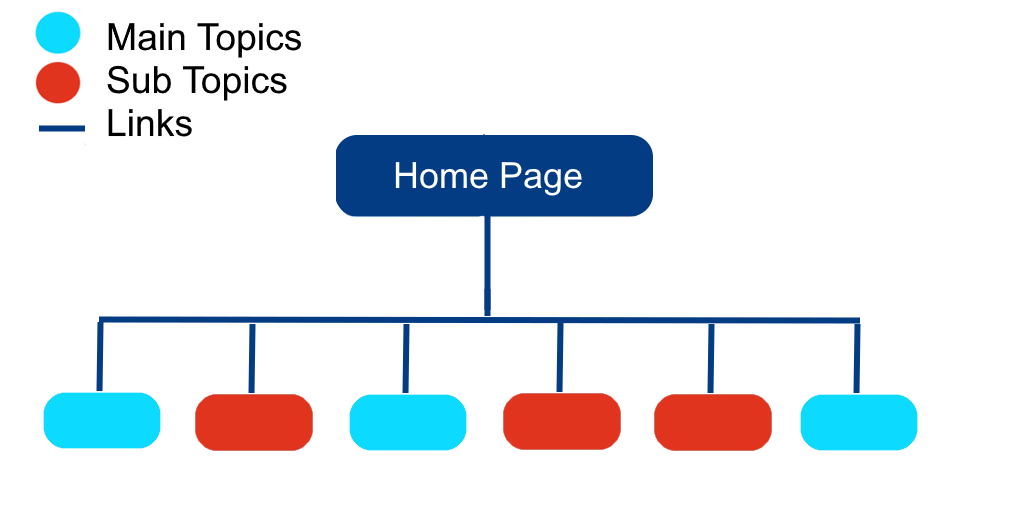
Many small sites grow like the diagram above: every page linked from the home page or menu, with nothing to show that some pages belong together. The fix is to organise pages into content hubs. A content hub is a group of pages on one topic, built around a central page that introduces the topic and links to the more detailed pages.
A skincare brand, for example, might build a hub on anti-ageing skincare. The hub page gives an overview, and linked pages cover choosing products, the science behind them and the ingredients that work. Silos, topic clusters and hub-and-spoke are different ways of building and linking those hubs.
You don’t need to rebuild a working site overnight. Google’s SEO starter guide says search engines will likely understand your pages as they are, and that how you organise content mainly affects crawling and indexing once a site has more than a few thousand URLs. For smaller sites, the bigger gains come from clear hubs and good internal links.
Internal linking models compared
Each model links pages in a different pattern. The table shows how they differ and when each fits.
| Model | How pages link | Best for | Watch out for |
|---|---|---|---|
| Flat structure | Home page links to everything; little else | Very small sites | No signal of which pages belong together |
| Silo | Pages link within their own section; few links between sections | E-commerce categories, sites with distinct product or service lines | Hiding useful related pages in other silos |
| Topic cluster | Pillar page links to subtopic pages; each links back to the pillar | Blogs and guides built around a few core subjects | Thin subtopic pages written only to fill the cluster |
| Hub-and-spoke | Hub links to spokes, spokes link back and to related spokes | Service businesses and in-depth topics with overlapping subtopics | Linking every spoke to every other spoke |
| Cornerstone content | Your most important pages get links from across the site | Any site; works alongside the other models | Choosing too many pages to be cornerstones |
In practice most sites combine them: silos for the main menu, clusters or hub-and-spoke inside each section, and a handful of cornerstone pages that the whole site points to.
Silo structure
A silo structure organises a website into separate sections, each focused on one topic, where pages link up to their section’s main page and to related pages within the same silo, but rarely to pages in other silos. Each silo’s main page is linked from the home page or main menu, so every section is easy to reach.
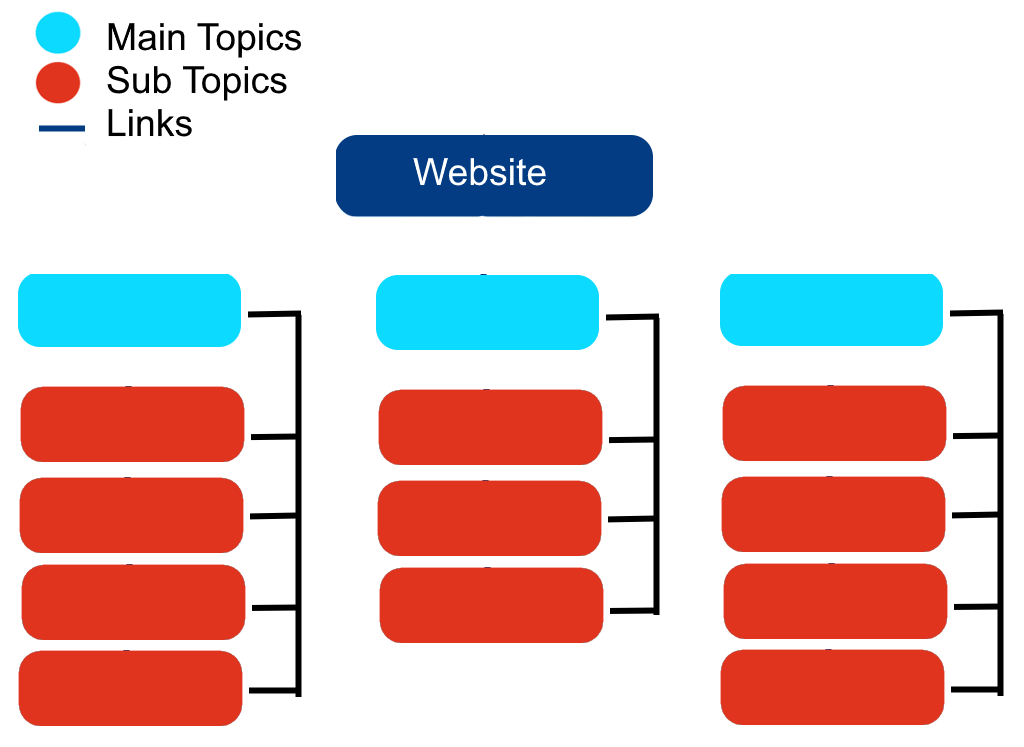
The aim is to make each section a clear, self-contained resource on its topic. A travel site might have silos for Europe, Asia and South America, each leading to country and city pages. An online shop might have silos for electronics, home appliances and fashion, each leading to sub-categories and then products.
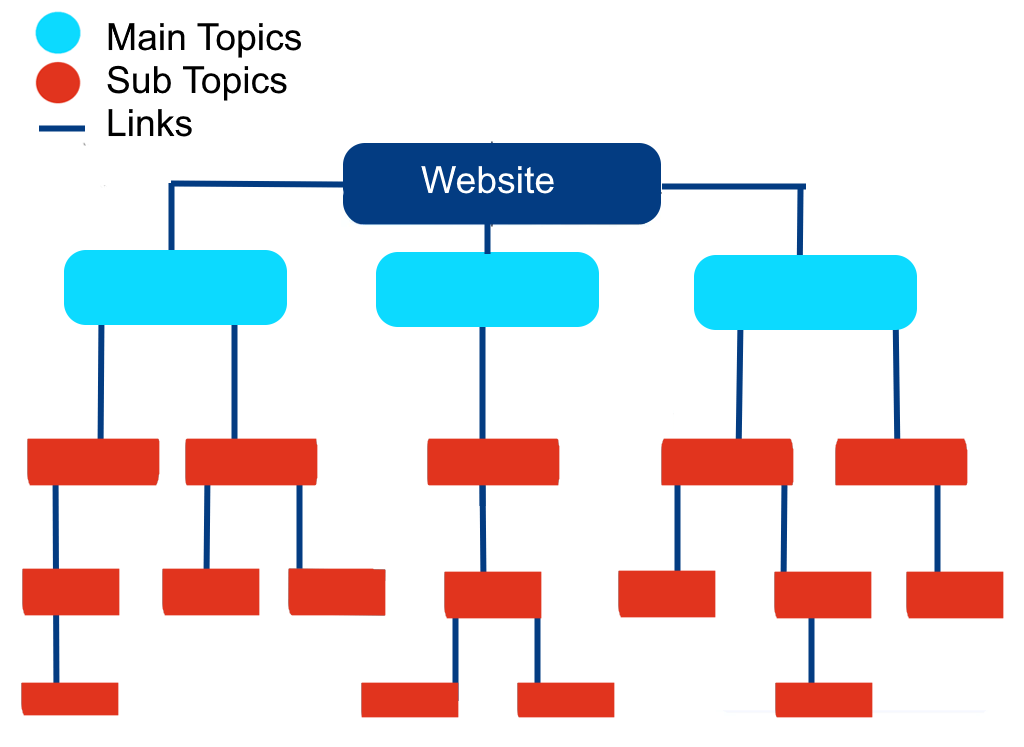
Silos are easy to manage and match how most shops and multi-service businesses already think about what they sell. Their weakness is rigidity. A strict silo can stop you linking to a genuinely useful page in another section, and complex subjects don’t always split cleanly into separate boxes. Allow cross-links between silos when they help the reader.
How to create a silo structure
- Research keywords to find the main topics and subtopics people search for in your area of business.
- Choose your main silos. These are your broadest topics, usually your main product categories or service lines.
- Create sub-silos for narrower topics within each one. A fitness site’s cardio silo might split into running, cycling and HIIT.
- Sort your existing pages into the right silos, and note gaps where a silo needs more content to be useful.
- Add internal links from each silo’s main page to its sub-pages, from sub-pages back up, and between closely related pages in the same silo.
- Review regularly as you add pages, so new content lands in the right silo and gets linked.
How to pass PageRank through content silos
PageRank is Google’s system for judging pages partly by the links pointing to them, and Google says it is still part of its core ranking systems. Internal links pass some of that value from page to page, so how you link inside a silo affects which pages Google sees as important.
To make the most of it:
- Link to each silo’s main page from your home page and main menu. The home page usually attracts the most links from other websites, and menu links appear on every page.
- Link from each main page to every important page in its silo, and from those pages back up to it.
- Link to your most important pages directly. Google’s e-commerce guidance suggests linking to a best-selling product from the home page to show how important it is.
- Make sure every page you want indexed can be reached by following links, not only through a sitemap.
- Keep links relevant. A few contextual links to closely related pages are worth more than long lists of links on every page.
Topic clusters and pillar pages
A topic cluster is a group of pages on one subject, made up of a pillar page that gives a broad overview and several cluster pages that each cover one subtopic in depth. The pillar links to every cluster page, and every cluster page links back to the pillar.
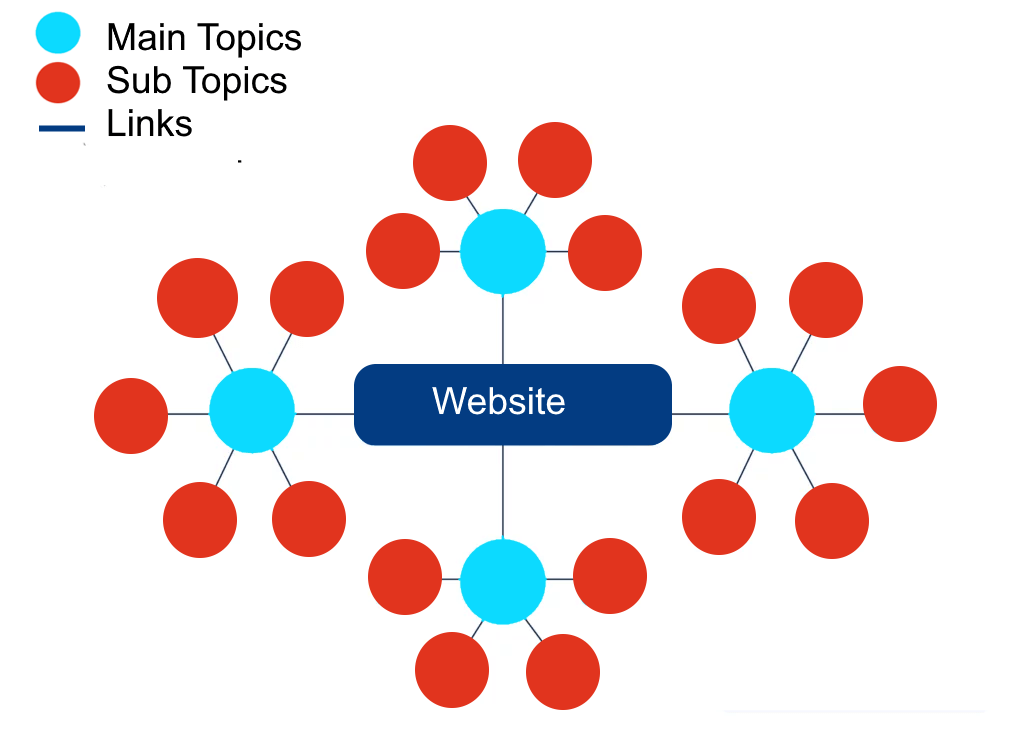
The pillar page is sometimes called an overview page. It should introduce the whole topic, answer the basic questions directly and send readers to the cluster pages for detail. An outdoor gear shop might build a cluster on camping, with a pillar page on camping and cluster pages on gear, recipes and safety. A law firm might build one on personal injury, with cluster pages on road traffic accidents, workplace injuries and slips and falls.
Topic clusters work best when a subject breaks into clear subtopics, and they can often be built from content you already have by adding a pillar page and the links. They take planning, and the cluster pages must each be useful on their own rather than written just to complete the set.
How to create a topic cluster
- Choose a core topic that matters to your business and is broad enough to have several subtopics.
- Research keywords to find the subtopics and questions people search for.
- Write or update the pillar page so it covers the whole topic at overview level.
- Create a page for each subtopic, covering it in depth.
- Link the pillar to every cluster page and each cluster page back to the pillar, using descriptive anchor text.
- Monitor and adjust. Use Google Search Console and Google Analytics 4 (GA4) to see which pages earn impressions and visits, then fill gaps.
The hub-and-spoke internal linking model
The hub-and-spoke model is an internal linking structure in which a central hub page links out to more specific spoke pages, each spoke links back to the hub, and spokes also link to other closely related spokes. It is very close to a topic cluster, and many people use the two terms for the same thing. The difference in how we use them is those spoke-to-spoke links.
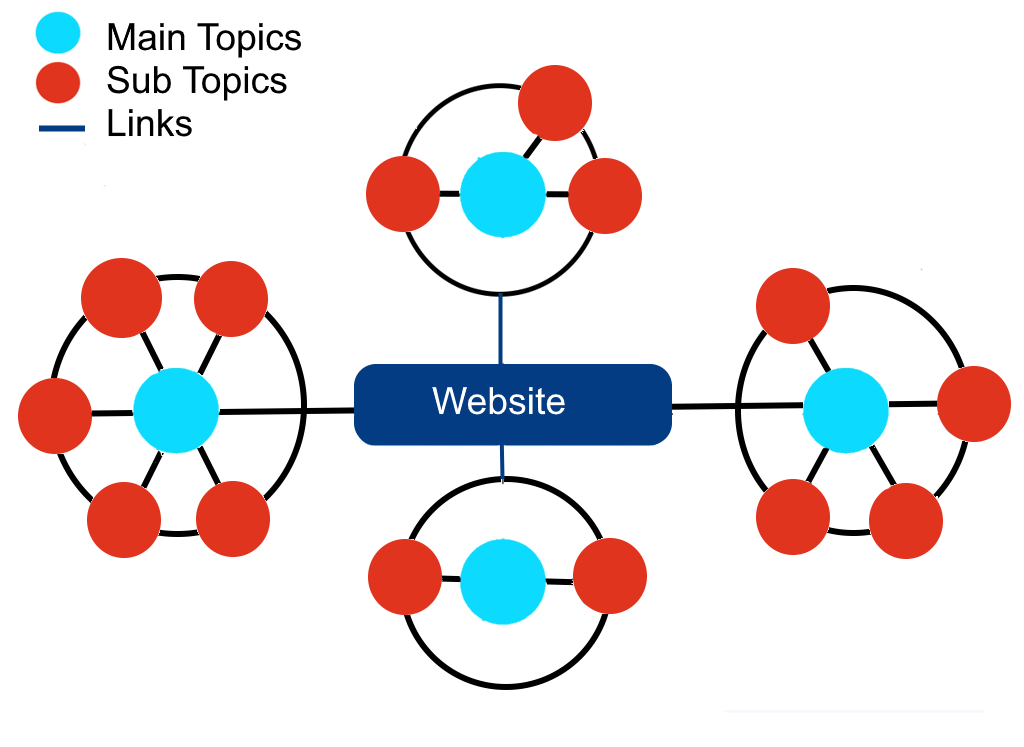
Those extra links help when subtopics overlap. A cooking site might have an Italian cuisine hub with spokes for pasta, risotto and sauces. Someone reading about pasta probably wants the sauces page too, so the two spokes link to each other as well as to the hub. A health site might have a nutrition hub where spokes on healthy eating and meal planning link across.
The model makes related content easy to explore and keeps each spoke focused. The risk is overdoing the cross-links: link spokes only where a reader would genuinely want to move between them.
How to create a hub-and-spoke model
- Choose a hub topic and make the hub page a complete guide to it at overview level.
- List the spokes, the specific subtopics or questions within the hub topic.
- Create a page for each spoke that covers its subject fully.
- Link the hub to each spoke with descriptive anchor text, and each spoke back to the hub.
- Link related spokes to each other where the subjects overlap.
Cornerstone content
Cornerstone content is the small set of in-depth pages that cover your most important topics and that you most want to rank. They usually act as the pillar or hub pages in your structure, and the rest of your site links to them.
Common types of cornerstone content are:
- Complete guides that cover a topic from every angle.
- Tutorials that walk readers through a process step by step.
- Case studies that show, with real data, how you solved a problem for a client.
Cornerstone pages work because they collect links. Link to them from your home page or main menu, and from every related article, using anchor text that describes the topic. Keep their number small: if every page is a cornerstone, none stands out.
They take time and resources to write well, and they cover a deliberately narrow set of topics, so choose subjects that match your expertise and what your customers search for. Plan to review and update them as your products, prices or the rules in your sector change. Our guide to SEO content strategy covers how to decide what those pages, and the rest of your content, should be.
Which structure should you use?
Choose the model that matches how your business and your customers naturally group things. Most sites end up combining two or three.
- Online shops usually suit a silo-style hierarchy of categories, sub-categories and products. Google recommends that category pages link directly to every product in the category and that menus link to category pages.
- Service businesses usually suit hub-and-spoke: a hub page for each service, with spokes answering the questions customers ask about it.
- Content-led sites such as blogs and resource libraries usually suit topic clusters, with a pillar page for each core subject.
Whatever you choose, give each hub or pillar a cornerstone page and link to it generously. If you are planning a new site, it is much easier to build the structure in from the start; our guide on where to start with web design covers planning your pages.
Internal linking best practices
Good internal links matter more than which model you pick. Google’s own guidance comes down to a few rules:
- Link every page you care about from at least one other page on your site.
- Write descriptive anchor text that is concise and relevant to both pages. Avoid “click here” and “read more”.
- Link in context. Add links within your text where a related page would help the reader understand the topic.
- Don’t overload pages with links. Google gives no ideal number, but says that if a page seems to have too many links, it probably does.
- Link to important pages more often, especially from the home page and menus.
To check your anchor text, read it on its own, without the sentence around it. If it doesn’t tell you what the linked page is about, rewrite it.
Internal linking is one part of a wider SEO plan. Our SEO process guide shows where it fits, and our search engine optimisation service covers structure, content and technical work together.
Frequently asked questions
What is a hub-and-spoke internal linking model?
It is a way of linking pages in which a central hub page links to more specific spoke pages, each spoke links back to the hub, and closely related spokes link to each other. It helps Google see that the pages form one topic and helps visitors move between related subtopics.
What is the difference between a silo and a topic cluster?
A silo is a section of a website on one topic, where pages link mainly within that section and rarely to other sections. A topic cluster is a pillar page linked to a set of subtopic pages that link back to it. Silos describe how the whole site is divided; clusters describe how pages within a topic are linked.
How do you pass PageRank efficiently through content silos?
Link to each silo’s main page from your home page and main menu, link from that page to every important page in the silo, and link those pages back up. Link directly to your most important pages, keep links relevant, and make sure every page you want indexed can be reached by following links.
What is an overview page in a content cluster?
An overview page, also called a pillar page, introduces a whole topic and links to the cluster pages that cover each subtopic in depth. It should answer the basic questions directly and work as the starting point for anyone new to the subject.
How many internal links should a page have?
There is no set number. Google says to link every page you care about from at least one other page and to add links where they help readers, and warns that if a page seems to have too many links, it probably does.
Do I need to restructure my whole website for SEO?
Usually not. Google says it will likely understand your pages as they are, and that organisation matters most for crawling once a site has thousands of URLs. Adding clear hub pages and better internal links is usually the best place to start.
Sources
Need a site structure that helps you rank?
We plan site structure, internal linking and content for Irish businesses as part of our search engine optimisation service.